Sunday, 31 October 2021

GUI Ping Monitor


 GUI Ping Monitor is a very easy to use, intuitive, with a clear interface tool. It allows you to ping any number of devices. A glance at GUI Ping Monitor and you know which devices have no communication.


Currently GUI Ping Monitor provides:
- ping utility.
- Name Server lookup.

Latest features:
- address of ping target is displayed (if you ping by hostname)
- configurable quick ping settings
- always on top setting
- application exists in system tray and remember position and size
- display modes (basic and extended)
- sound notifications.

New features will be added in the nearest feature.

Download 

  • https://sourceforge.net/projects/gui-ping-monitor/files/latest/downloadresses

Monday, 25 October 2021

Beacon teaching typing free

 Is Mavis Beacon teaching typing free?

How much does Mavis Beacon cost? You can download and use Mavis Beacon on your Windows PC for free. The app does have a few premium versions that include additional skill-building games and lessons, as well as typing tutorials in other languages

کمپیوٹر کی ایک ڈرائیو فارمیٹ ہو گئی ہئے

 اسلام وعلیکم

غلطی سے میرے ڈسک ٹاپ کمپیوٹر کی ایک ڈرائیو فارمیٹ ہو گئی ہئے دوستوں کوئی ایسا سافٹ ویئر
بتائیں جس سے فری میں ڈیٹا ریکوری ہو جائے شکریہ

https://www.magoshare.com/

جنریشن کیسے چیک کرتے ھیں

 بہت زیادہ دفعہ یہ سوال پوچھا گیا ھے

جنریشن کیسے چیک کرتے ھیں
تو مائ کمپیوٹر کو رائٹ کلک کر کے پراپرٹی میں چلے جایئں وھان پروسیسر کے بعد جو پہلا ھندسہ ھے جو جنریشن کو ظاہر کرتا ھے
نیچے تصویر میں رھمنائ کی گئ ھے
انٹل کور 5 کے بعد 5300 ھے تو پہلا ھندسہ 5 ھے جو 5 جنریشن کو دکھا رھے ھے


Sunday, 17 October 2021

https://play.google.com/store/apps/details?id=by.wanna.apps.wsneakers&hl=en&gl=US

https://portal.photomath.net/

 https://portal.photomath.net/

https://play.google.com/store/apps/details?id=com.photomyne.colorize&hl=en&gl=US

 https://play.google.com/store/apps/details?id=com.photomyne.colorize&hl=en&gl=US

(Cell)WiFi Passwords by Instabridge - Apps on Google Play


WiFi Passwords by Instabridge - Apps on Google Play

(Cell ph)https://countthings.com/

 https://countthings.com/

https://www.virustotal.com/gui/home/upload

 https://www.virustotal.com/gui/home/upload

Artificial intelligence


Unlike any other domain, BoredHuman.com helps you turn your idea into reality and paves the way for your future ... .COM is by far the most popular domain ...
Artificial intelligence is a general term that can refer to many different techologies, such as those used in self-driving cars, facial recognition, customer

Analyze suspicious files and URLs to detect types of malwar

 Analyze suspicious files and URLs to detect types of malware, automatically share them with the security community. 


https://www.virustotal.com/gui/home/upload

history.com google

 history.com google


What is my Google history?
Select the “Data & Personalization” tab. Scroll down to the “Activity and Timeline” section, then click on “My Activity.” Scroll down the page to use the general search bar or the “Filter by Date and Product” option (Android, Maps, YouTube, etc.), or just scroll down the list and browse by date and time.

Monday, 30 August 2021

Configuring Remote IP Cameras

Configuring Remote IP Cameras

Remote Device Setup with POE switch

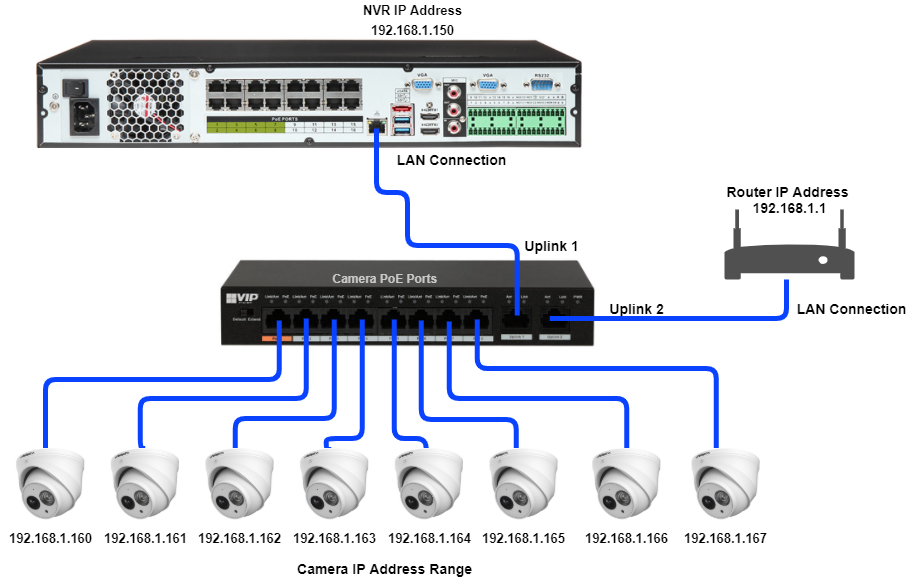
Some installations may require cameras to be added to the NVR over the network. This may be the case if the NVR doesn't have POE ports, or if a wireless bridge is involved in the installation. In this case the cameras need to be added to the NVR via a different method, see below for details.

Important Note

If this is a business installation, please make sure you consult with the Manager and/or IT department before installing any devices that will need to be connected to the network. 

Installing a network device without approval and prior knowledge of how the network is setup, has the potential to cause critical devices to fail, bring down the network and even stop business' server/software from operating.

Please be advised the following instructions are only true for simple networks

Warning

When connecting cameras over the network, they must only connect to the NVR's LAN Port as shown in the above diagram.

Do not connect ANY Network Devices/Switches to the NVR POE Ports

Only Connect 1 IP Camera per channel of the NVR

Configuration via PC is required to address and initialise multiple cameras.

Step 1 - CMD: Identify and Set an IP Address
Step 2 - Initialise the cameras
Step 3 - Setting Camera IP Address with Config Tool
Step 4 - Recorder Network Configuration
Step 5 - Adding Cameras to the Recorder


Optional - Initializing Cameras from the NVR

In some installations you may find it easier to initialize cameras directly from the recorder, this method works best when adding a few camera.

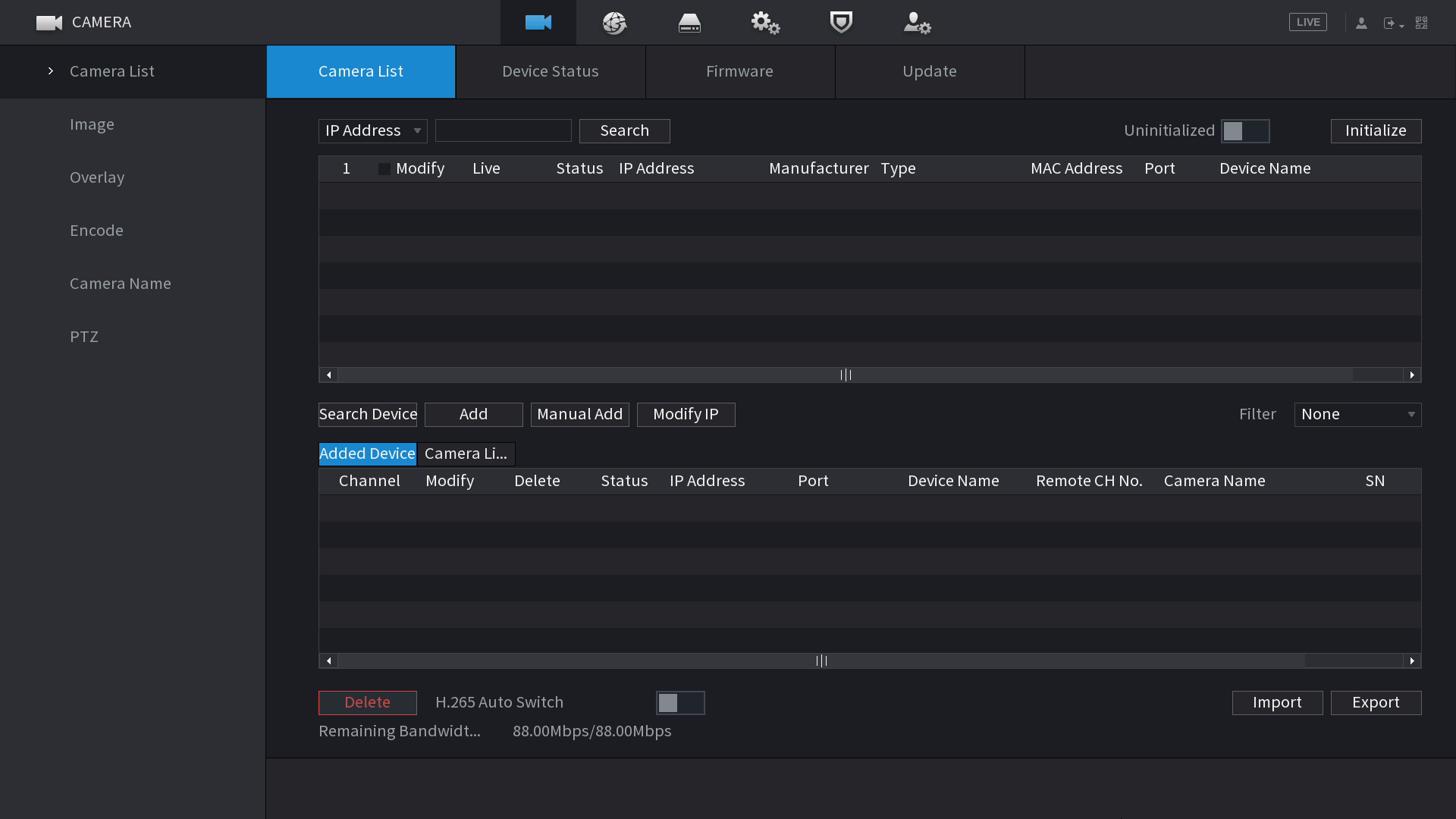
  1. Right click and select Main Menu, then Camera.
  2. Select Device Search.
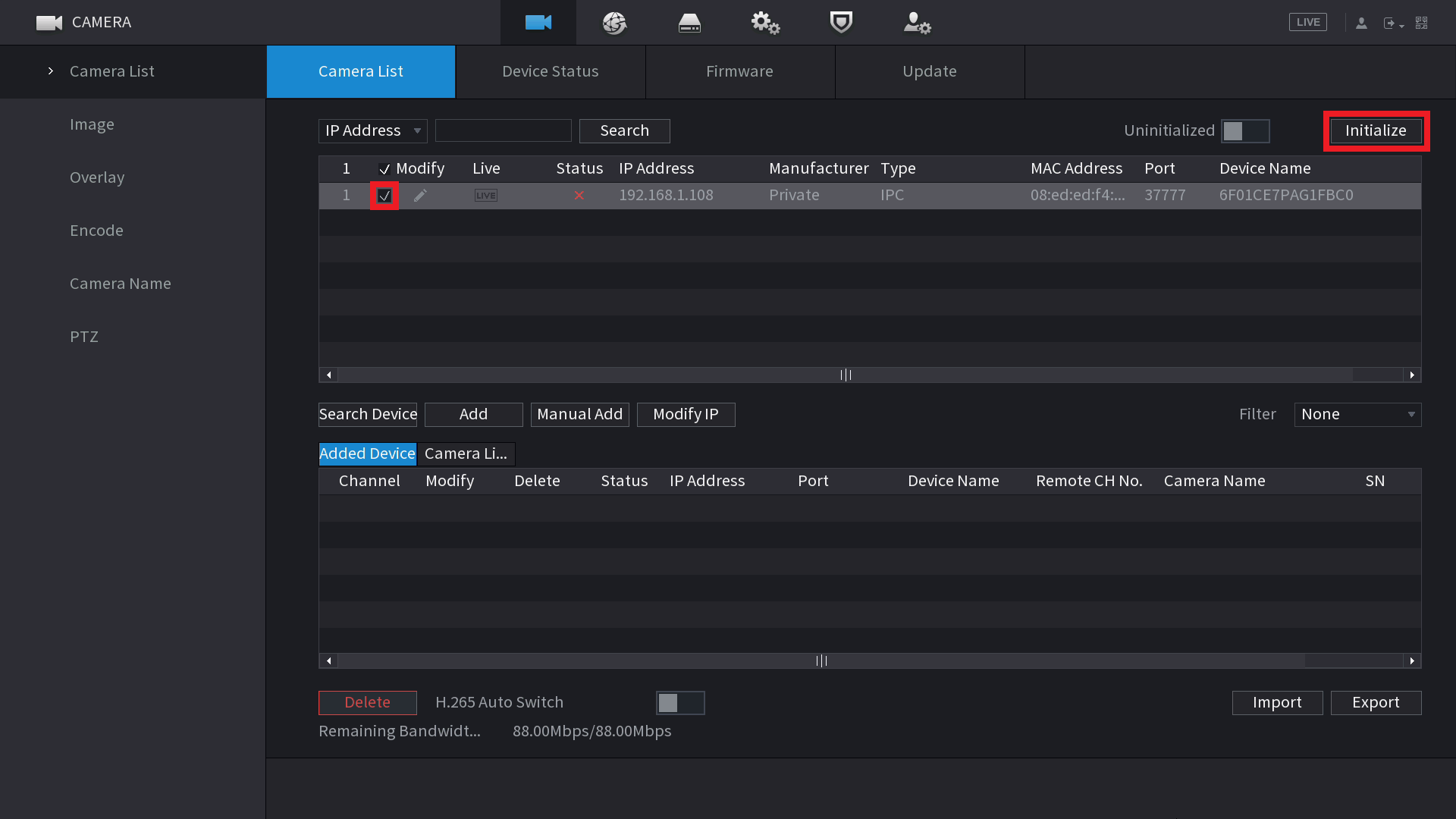
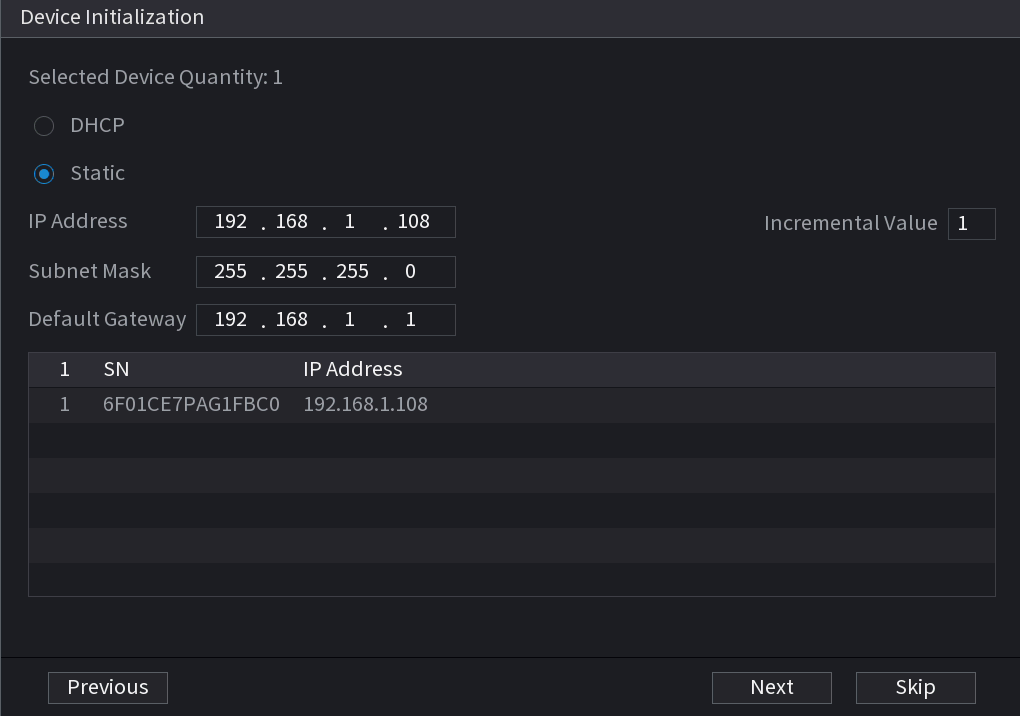
  3. Select the cameras you wish to initialise, then click Initialize.
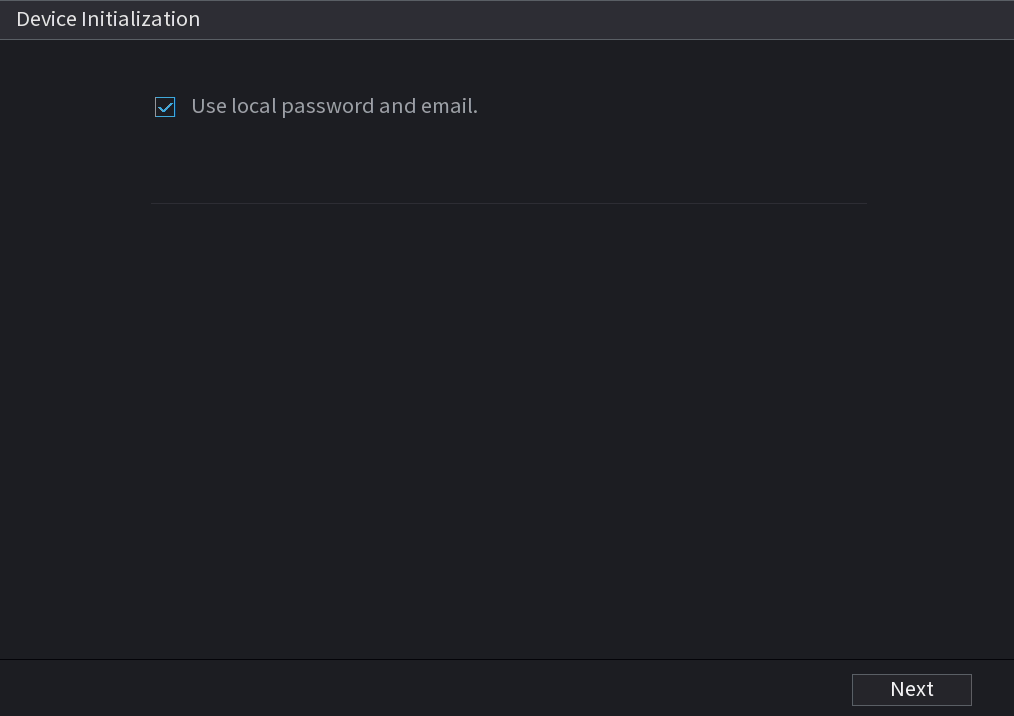
  4. Select Next.
  5. Enter the IP AddressSubnet Mask and Default Gateway, then click Next.
    NOTE: When initialising more than one camera, the last section of the IP address will be incremented by the Incremental Value.
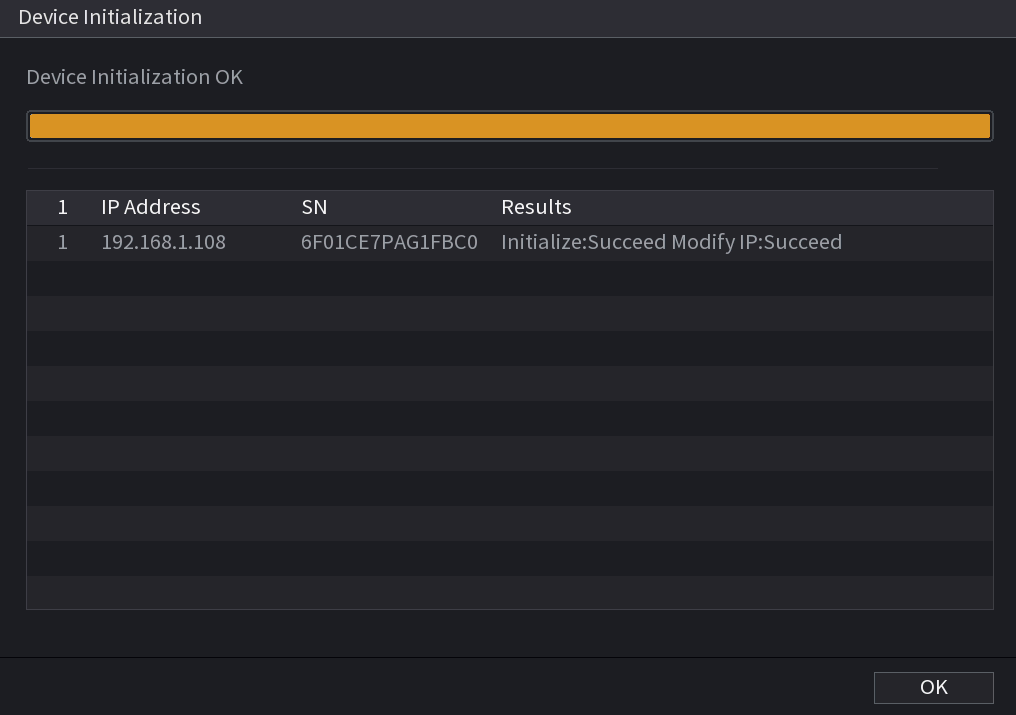
  6. Select OK.
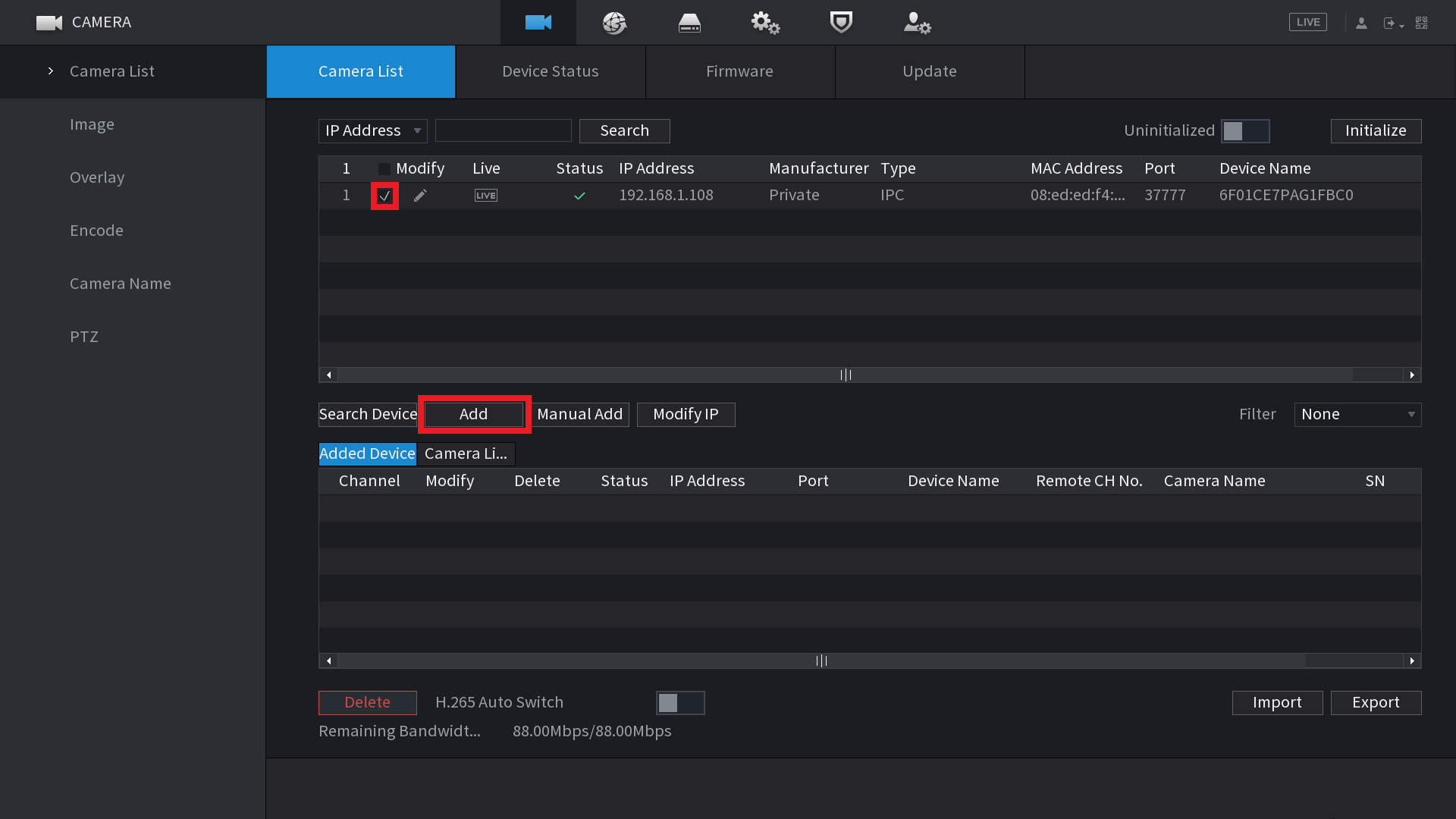
  7. Select the Cameras you wish to add, then select Add.

Was this article helpful?

   Send feedback

Can’t find what you’re looking for?

Our customer care team is here for you.

Contact Support

© 2021 - Copyright Cornick

Thursday, 12 August 2021

Unsplash - for free stock images: Best Free Online Alternative Photoshop

 Unsplash - for free stock images:

www.unsplash.com Fuzzimo - for high-quality textures and other freebies: www.fuzzimo.com Photopea - Best Free Online Alternative Photoshop: www.photopea.com

Wednesday, 11 August 2021

ڈالرز کمانے کا آسان ترین طریقہ۔

ڈالرز کمانے کا آسان ترین طریقہ۔
پہ جائیں، وہاں اپنی آئی ڈی بنایئں. وہاں پر مختلف قسم کی پروجیکٹ پر آپ کام کرسکتے ہیں۔
میں یہاں ایک طریقہ صرف ریفرنس کیلئے شیئر کرتا ہوں۔ #بیک_گرائونڈ ریموول ایکسپرٹ کی۔
🔴 لوگوں کو بتایئں آپ بیک گرائونڈ ریمو کا تسلی بخش کام کرتے ہیں۔ ایک اچھی پرکشش قیمت سے شروع کریں۔
جب آرڈر آئے، تو https://www.remove.bg پر جائیں، وہاں کسٹمر کی دی گئی تصویریں لگائیں اور ایک ہی کلک سے بیک گرائونڈ غائب۔ یا بعض اوقات اپنی کام کیلئے بھی استعمال کرسکتے ہے۔
✍️⁩انہیں save کریں اور کسٹمر کو بھیج دیں۔

Wednesday, 4 August 2021

Tuesday, 3 August 2021

Monday, 2 August 2021

Paid For Articles


Go and Signup Now https://paidforarticles.com/ Disclaimer: - This Channel DOES NOT promote or encourages any illegal activities and all content provided by this channel is meant for EDUCATIONAL PURPOSE only. If you have any questions or problems you can contact us at paidforarticlesofficial@gmail.com. Team. Paidforarticles.com


online plagiarism remover


https://www.plagiarism-remover.com/advance-plagiarism-remover.php

ہم نے آپ کے لیے پانچ حق اشاعت سے پاک ویڈیو ویب سائٹس جمع کی ہیں۔ We Have Collected Top Five Copyright free video websites for you.

 We Have Collected Top Five Copyright free video websites for you.


ہم نے آپ کے لیے پانچ حق اشاعت سے پاک ویڈیو ویب سائٹس جمع کی ہیں۔


1- Pexels.com

You can use all images for free, even for commercial use. All images are completely royalty free and licensed under the Pexels license. Use them for any project you want.

Copyright Free Videos With Creative Common License :

https://www.pexels.com/@vimeo

https://www.pexels.com/@pixabay

https://www.vidnami.com/

2- Pixels.com

Boost Your Business With the Right Pixels ImagesRoyaltyFree and Ready to Use. Browse Photos, Vectors, Icons and Much More. Simple Licensing, Dedicated Customer Support. Clips for Less Than $9. 200K Images Added Daily. Original & Fresh Content.

3- Mixkit.co

Browse our library of extraordinary free stock footage and motion clips for every occasion. All HD Video Clips are completely free to download and use.

4- videvo.net

Download free stock video footage with over 70000 video clips in 4K and HD. We also offer a wide selection of music and sound effect files with over 180000 stocks.

5- http://mazwai.com

Download free stock video footage with clips available in HD. Click here to download royaltyfree licensing videos from Mazwai now.

Make A Nice Living Auto Surfing Online Everyone Can Do It Copied with permission from: http://plrplr.com/


اگر آپ تھوڑی دیر کے لیے آن لائن رہے ہیں تو ، غالبا آپ نے ویب صفحات پر سرفنگ ، اشتہارات پر کلک کر کے یا ای میل پڑھ کر پیسہ کمانے کے بارے میں بز کو دیکھا یا سنا ہوگا۔


http://plrplr.com/

If you have been online for a while, most likely you have seen or heard the buzz about making money by surfing web pages, clicking on ads or reading emails.


Can you really make a nice living by surfing online? The answer is a big YES, and it is proven by hundreds and thousands of people every day. The standard return is 1-4% daily. With 1% daily and using the compounding option, you can earn up to 600% -1000% or more in a year.

Image invest $1000 and get back $6000 in a few months or a year, no other banks can beat the return on this.

But, as with everything else, you need find the right program to join and the right way to get started.

Autosurf is a form of advertisement that automatically rotates ads in a viewer’s Internet browser. The advertisers pay to the host for their ads or websites to be displayed, and the host pays its members in a certain percentage or on an hourly basis.

It is normally free to join the Autosurf programs, some hosts even give free $10 or $20 bonus to simply ask you to test and get familiar with their system.

Upon joining, you will make money by watching the advertisement rotation in your browser and make a commission by doing this. The pages you need to surf per day vary in different programs, some require you to watch 10-20 pages while others may require 200 pages a day, it can normally be done in between 10 minutes to 1 hour.

As a matter of fact, you don’t even need to sit in front of a computer all the time to watch the pages, you can just open the surf page and go away, just let the page rotate itself. But you always find some interesting or helpful sites listed and want to explore further.

If you want to make more money, you can upgrade to the level you are comfortable with to gain better returns, each program has their own rules on the minimum and maximum funds allowed in the upgrade, bigger upgrade will yield bigger returns.

The payout period change from program to program too, with some you can gain profit as quick as 5-10 days, while the others will require you surf for a month or even longer to receive payment.

There are many auto surf programs and it is definitely worth the time and effort to do the in-depth research before you purchase upgrade.

Just like other investment, you need understand the program before you jump in; here are the important areas you should check at:

1. Program History

Read the web page of the program you are interested in joining, and find out how long it has been around and its vision for the future growth. Autosurf industry is relatively new and lots of them come and go quickly. You need find the stable and longevity ones to invest in.

Always remember, don’t only look at the returns. If the promise is too good to be true, it is probably not true.

2. Program Forum

The reputable surf program always setup forums for their members to voice their concerns or excitement, and exchange information. The forum admin will also get involved in answering questions and issues.

There is always “I Get Paid” section for users to post their payment screenshot too.

By reading through the forum, you will get the sense of enthusiastic and support among the group of “investors”, you will also develop your personal confidence about the future of the program.

3. Other Online Discussion Groups

There are a lot of other Autosurf discussion forums or discussion groups on the Internet, do a search on Google and you will find a handful of them. Read through the posts and find the best program that suits your needs or surfing habit.

Go with the flow, chances are, you won’t make disastrous mistakes if hundreds or thousands people praise the program and are willing to put their hard earned money into it again and again.

User support plays a strong role in the success and longevity of Autosurf program.

4. Play safe

Play safe, start small. All Autosurf program has risk in it, the rule of thumb is: DO NOT put more than you can afford to lose, doesn’t matter how enticing the program is.

Set your target high, but do not let your greedy and high expectation carry you away.

If you choose the right program and stay upgrading for a few cycles, you will see your money pilled up quickly. Keep your principle and use the profit to invest so you won’t feel too much pain if the program shut down overnight.

5. Understand Terms and Conditions

If you decide to join the program, make sure you spend enough time on reading the programs terms and conditions. Some programs have strict rules on upgrading, surfing, spam, etc. If you violate the rules, you will find your account is suspended in no time.

6. Diversification

Don’t put all your eggs in one basket, find a few good programs and diversify your money in them.

But don’t open too many accounts that you can not manage in a day. Remember, you have to surf everyday to accumulate the profit, in Autosurf world, everyday counts.

When plan properly and invest wisely, you will earn a decent living by surfing less than 1 hour online. In fact, lots of people give up their jobs for Auto Surfing.

Don’t let the opportunity passing by; you need try it to find the happiness and fulfillment the exciting programs can bring. It can literally change your life, a chance to say goodbye to the hard-dirty, long-hour and low-paid work.


Tuesday, 27 July 2021

Monday, 26 July 2021

کیا ﺁﭖ '' ﺍَﻟﺘَﺤِﻴَّﺎﺕُ '' ﮐﺎ ﭘﺲ ﻣﻨﻈﺮ ﺟﺎﻧﺘـے ﮨﯿﮟ ﮐﮧ ﮨﻢ ﮐﯿﻮﮞ ﻧﻤﺎﺯ ﻣﯿﮟ ﺍﺳﮯ ﭘﮍﮬﺘـے ﮨﯿﮟ؟

کیا ﺁﭖ '' ﺍَﻟﺘَﺤِﻴَّﺎﺕُ '' ﮐﺎ ﭘﺲ ﻣﻨﻈﺮ ﺟﺎﻧﺘـے ﮨﯿﮟ ﮐﮧ ﮨﻢ ﮐﯿﻮﮞ ﻧﻤﺎﺯ ﻣﯿﮟ ﺍﺳﮯ ﭘﮍﮬﺘـے ﮨﯿﮟ؟

'' ﺍَﻟﺘَﺤِﻴَّﺎﺕُ '' ﺍﯾﮏ ﺑﮩﺖ ﺍﮨﻢ ﺩﻋﺎ ھــے ﺟﺴﮯ ﮨﻢ ﺍﭘﻨﯽ ﺭﻭﺯ ﮐﯽ ﻧﻤﺎﺯ ﻣﯿﮟ ﺩہرﺍﺗـے ﮨﯿﮟ ﺟﺐ ﻣﺠﮭـے ﺍﺱ ﮐﯽ ﺍﮨﻤﯿﺖ ﻣﻌﻠﻮﻡ ﮨﻮﺋﯽ ﺗﻮ ﻣﯿﺮﺍ ﺩﻝ ﭘﮕﮭﻞ ﮔﯿﺎ-

ﺩﺭﺣﻘﯿﺖ '' ﺍَﻟﺘَﺤِﻴَّﺎﺕُ '' ﺍﺱ ﻣﮑﺎﻟﻤﮯ ﮐﺎ ﺍﯾﮏ ﺣﺼﮧ ھــے ﺟﻮ ﺩﻭﺭﺍﻥ ﻣﻌﺮﺍﺝ ﺍﻟﻠﮧ ﺭﺏ ﺍﻟﻌﺰﺕ ﺍﻭﺭ ﺍﺱ ﮐﮯ ﻣﺤﺒﻮﺏ ﻣﺤﻤﺪ ﷺ ﮐﮯ ﻣﺎﺑﯿﻦ ﮨﻮﺍ -

ﺟﺐ حضرت محمد ﷺ ﺍﻟﻠﮧ ﺭﺏ ﺍﻟﻌﺰﺕ ﺳﮯ ﻣﻠﮯ ﺗﻮ ﺁﭖ ﷺ ﻧﮯ ' ﺍَﺳَّﻠَﺎﻡُ ﻋَﻠَﯿﮑُﻢ ' ﻧﮩﯿﮟ ﮐﮩﺎ - ﮐﻮﺋﯽ ﺍﺱ ﺫﺍﺕ ﮐﻮ ﮐﯿﺴـے ﺳﻼﻡ ﮐﮩﮯ ﺟﻮ ﺑﺬﺍﺕ ﺧﻮﺩ ﭘﯿﮑﺮ ﺳﻼﻡ ھــے ؟ ﮨﻢ ﺍﺳﮯ ﺳﻼﻡ ﻧﮩﯿﮟ ﮐﺮ ﺳﮑﺘﮯ ﮐﯿﻮﻧﮑﮧ ﺳﺎﺭﯼ ﺳﻼﻣﺘﯿﻮﮞ ﮐﺎ ﺧﺎﻟﻖ ﻭﮦ ﺧﻮﺩ ھــے

 ﻟﮩﺬﺍ ﺭﺳﻮﻝ ﺍﻟﻠﮧ ﷺ ﻧـے ﻋﺮﺽ ﮐﯿﺎ :- '' ﺍَﻟﺘَﺤِﻴَّﺎﺕ ُﻟِﻠَّﻪِ ﻭَﺍﻟﺼَّﻠَﻮَﺍﺕُ ﻭَﺍﻟﻄَّﻴِّﺒَﺎﺕُ"

ﺗﻤﺎﻡ ﺯﺑﺎﻥ ﮐﯽ ﺑﺪﻧﯽ ﺍﻭﺭ ﻣﺎﻟﯽ ﻋﺒﺎﺩﺍﺕ ﺍﻟﻠﮧ کیلئـے ﮨﯿﮟ

 ﺍﻟﻠﮧ ﺳﺒﺤﺎﻥ ﺗﻌﺎﻟﯽ ﻧـے ﺍﺭﺷﺎﺩ ﮐﯿﺎ:- ﺍﻟﺴَّﻠَﺎﻡُ ﻋَﻠَﻴْﻚَ ﺃَﻳُّﻬَﺎ ﺍﻟﻨَّﺒِﻲُّ ﻭَﺭَﺣْﻤَﺔُ ﺍﻟﻠَّﻪِ ﻭَﺑَﺮَﻛَﺎﺗُﻪُ

ﺍﮮ ﺍﻟﻠﮧ ﮐﮯ ﻧﺒﯽ ﺁﭖ ﭘﺮ ﺍﻟﻠﮧ ﮐﺎ ﺳﻼﻡ ﺍﻭﺭ ﺑﺮﮐﺘﯿﮟ ﮨﻮﮞ

 ﺍﺱ ﮐﮯ ﺟﻮﺍﺏ ﻣﯿﮟ ﺭﺳﻮﻝ ﺍﻟﻠﮧ ﷺ ﻧـے ﻓﺮﻣﺎﯾﺎ :- ﺍﻟﺴَّﻠَﺎﻡُ ﻋَﻠَﻴْﻨَﺎ ﻭَﻋَﻠَﻰ ﻋِﺒَﺎﺩِ ﺍﻟﻠَّﻪِ ﺍﻟﺼَّﺎﻟِﺤِﻴﻦَ

 ﺳﻼﻡ ﮨﻮ ﮨﻢ ﭘﺮ ﺍﻭﺭ ﺍﻟﻠﮧ ﮐﮯ ﺻﺎﻟﺢ ﺑﻨﺪﻭﮞ ﭘﺮ

 ﻧﻮﭦ:- آپ ﷺ ﻧـے "ﮨﻤﯿﮟ" ﺑﮭﯽ ﺍﺱ ﺟﻮﺍﺏ ﻣﯿﮟ ﺷﺎﻣﻞ ﮐﯿﺎ, (ﺍﻭﺭ ﺍﻟﻠﮧ ﮐﮯ ﺻﺎﻟﺢ ﺑﻨﺪﻭﮞ ﭘﺮ)

ﺍﻟﻠﮧ ﻋﺰﻭﺟﻞ ﺍﻭﺭ ﺍﺱ ﮐﮯ ﺣﺒﯿﺐ ﷺ ﮐﮯ ﻣﺎﺑﯿﻦ ﯾﮧ ﻣﮑﺎﻟﻤﮧ ﺳﻦ ﮐﺮﻓﺮﺷﺘﻮﮞ ﻧـے ﮐﮩﺎ ﺃَﺷْﻬَﺪُ ﺃَﻥْ ﻟَﺎ ﺇِﻟَﻪَ ﺇِﻟَّﺎ ﺍﻟﻠَّﻪُُ ﻭَﺃَﺷْﻬَﺪُ ﺃَﻥَّ ﻣُﺤَﻤَّﺪًﺍ ﻋَﺒْﺪُﻩُ ﻭَﺭَﺳُﻮﻟُﻪ

ﻣﯿﮟ ﮔﻮﺍﮨﯽ ﺩﯾﺘﺎ ﮨﻮﮞ ﮐﮧ ﺍﻟﻠﮧ ﮐﮯ ﺳﻮﺍ ﮐﻮﺋﯽ ﻣﻌﺒﻮﺩ ﻧﮩﯿﮟ, ﺍﻭﺭ ﻣﯿﮟ ﮔﻮﺍﮨﯽ ﺩﯾﺘﺎ ﮨﻮﮞ ﮐﮧ ﺣﻀﺮﺕ ﻣﺤﻤﺪ ﷺ ﺍﻟﻠﮧ ﮐﮯ ﺑﻨﺪﮮ ﺍﻭﺭ ﺍﺳﮑﮯ ﭘﯿﻐﻤﺒﺮ ﮨﯿﮟ۔ﺳﺒﺤﺎﻥ ﺍﻟﻠﮧ !!

ﺍﺱ ﻣﻌﻠﻮﻣﺎﺗﯽ ﭘﯿﻐﺎﻡ ﮐﻮ ﺷﯿﺌﺮ ﮐﯿﺠﺌـے۔۔۔۔۔

 ﺗﺨﯿﻞ ﮐﯿﺠﺌـے ﮐﮧ ﺟﺐ ﺍﻭﺭ ﻟﻮﮒ ﺍﺳﮯ ﺟﺎﻧﯿﮟ ﮔﮯ ﺗﻮ ﺁﭖ ﺍﺟﺮ ﭘﺎﺋﯿﮟ ﮔﮯ۔

 ﺟﺰﺍﮐﻢ ﺍﻟﻠﮧ خیراً و کثیراً

 بحوالہ (بخاری ومسلم) مظاہر حق جدید, شرح مشکوۃ شریف, باب: تشہد کا بیان، صفحہ 588 تا 593.

فری میں کمانے کے طریقے


فری میں کمانے کے طریقے 

1.  https://www.blogger.com